 siftware.dev
Know where your agency's time and money go
Projects, time, the team's schedule and every client's budget, in one place. In the browser, and in a native app for iPhone and iPad.
Follow the build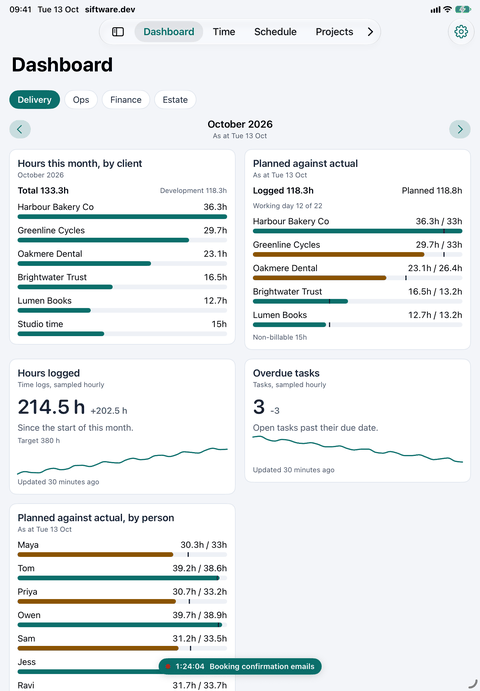
We built the tool we kept looking for
For years we ran Siftware on someone else's project tool. It was fine. It was never quite right for the way an agency actually works.
Time lived in one product, the schedule in another, the budgets in a spreadsheet and the money in the accounts. Joining it all up meant paying several vendors for one job, then wiring them together with API calls that broke at the worst moment.
So we took the shape of what we knew, rebuilt it around how we work, and put everything in one place.
We scratched our own itch. If your agency itches in the same places, read on.
A timer that keeps going
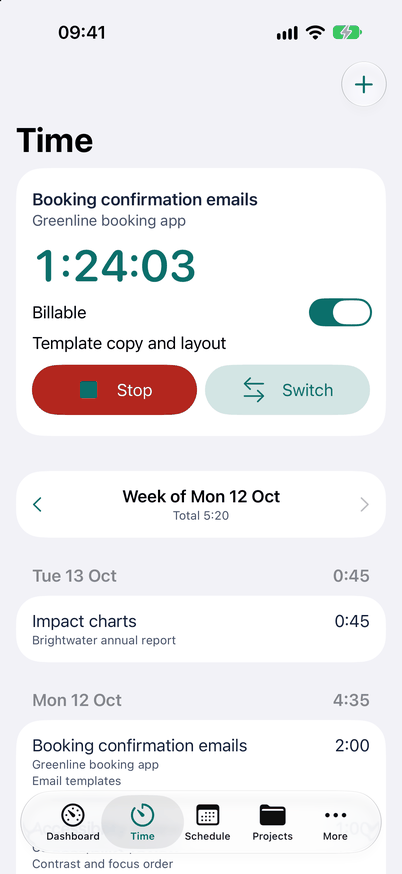
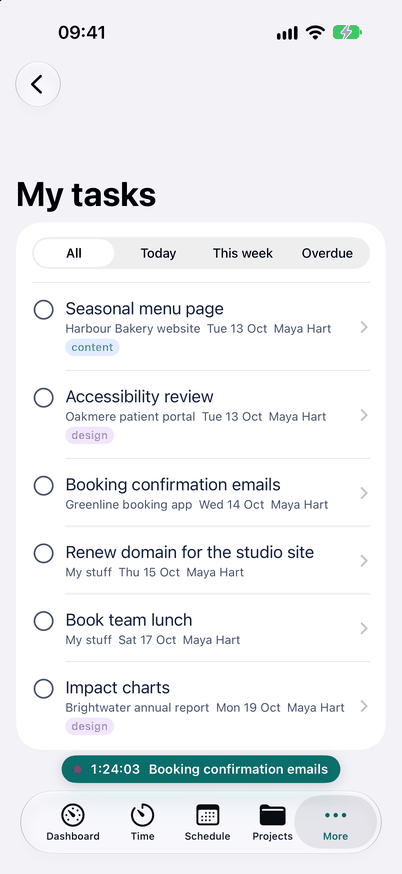
Start it from the task on your phone and walk into the meeting. The timer runs on the server, so it keeps counting whatever your phone does, and it is still running when you sit back down at your laptop.
Forgot to start it? Quick-log puts time against any task from anywhere in the app, billable or not.
On a Linux desktop, Snag sits in the tray and does the same from the keyboard. Mac next.
Control the schedule from your deckchair
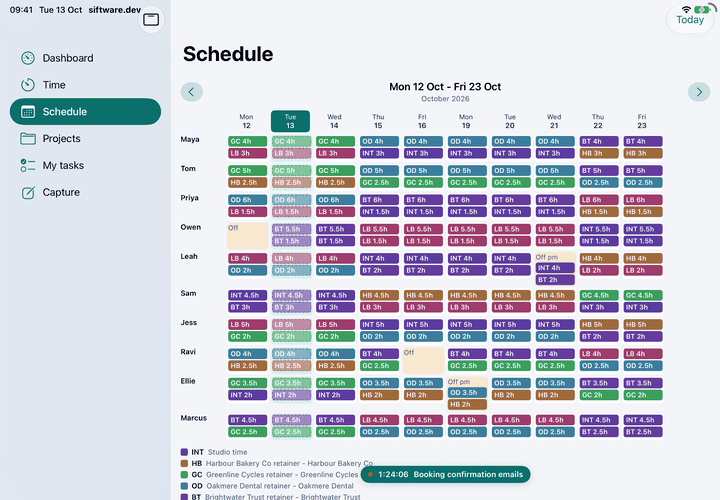
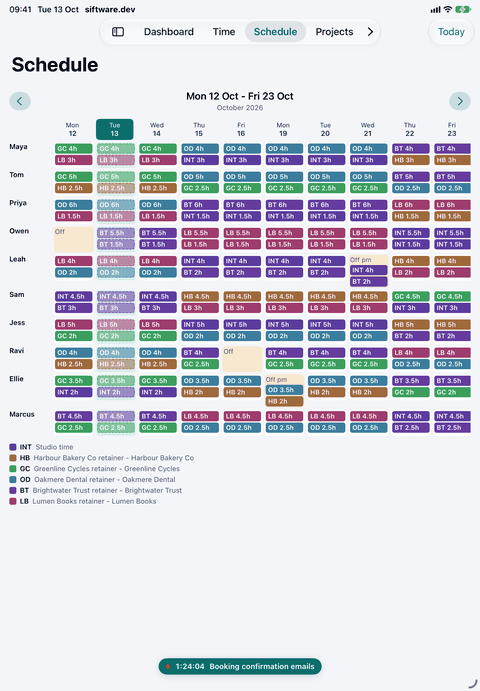
The team's schedule is on the iPad: people down the side, working days across, two weeks at a glance. See who is booked on what and who is off, with the bank holidays already in.
Capacity starts from the money. Each stream of work has a client and a budget in days, set against the days your people actually have. If the month does not fit, you know at the start of it.
Planned against actual, while it still matters
The dashboard puts hours by client next to what was planned, so an overrun shows up while there is still time to do something about it, not when the invoice goes out.
Choose the widgets you want on it. The support queue can live there too.
Catch it before it goes
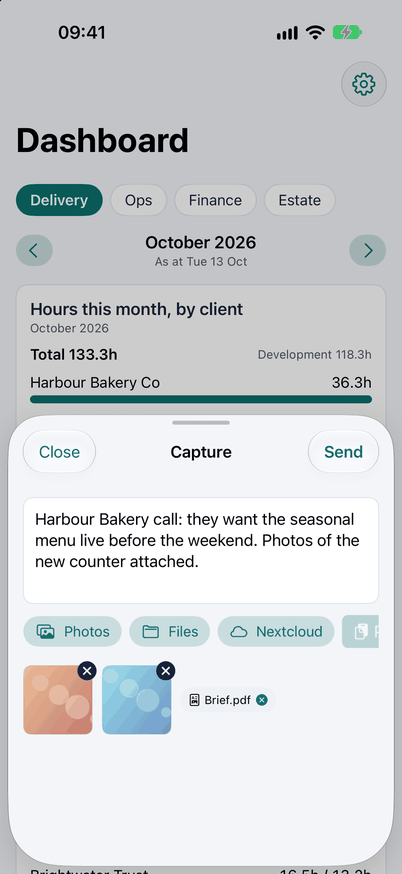
Something comes up on site or in the corridor. Open the app and it goes straight into today's note: a photo, a file, whatever is on your clipboard, or a file from Nextcloud.
Back at your desk, today's note is a canvas. Turn what you caught into a task or a doc there.
No connection? Keep working
Every project and task is on your phone. On the train or on a site with no connection, carry on as normal and it syncs when you are back online.
On iPad it opens out into a sidebar layout made for the bigger screen.
Everything an agency runs on
- Unlimited projects
- Every client and every job, with no cap on how many you run.
- Unlimited client logins
- Every client can log in to see their work, with no per-seat costs as you grow.
- Native time tracking
- On iPhone and iPad, and Snag on the desktop. The timer follows you between them.
- Kanban boards
- A board for every project. Drag cards between columns and the whole team sees it.
- Cashflow forecasting
- What is coming in and going out over the months ahead, before it surprises you.
- Xero integration
- Works with Xero, so invoices and contacts line up with the work they belong to.
- Client reporting
- Hours and budget against plan, ready to send to the client.
- Server and estate monitoring
- If you host and look after client servers, their health sits next to the client's work.
- Companies and contacts
- Who the work is for, and who to talk to there.
- Support from email
- Mail to your support address becomes a ticket, and the team answers from the app.
- Inbox agent
- Reads incoming mail, sorts it and learns your rules from the answers you give it.
- REST API
- Tokens per person or per agent, each with only the permissions it needs.
We run Siftware on it
Siftware is a small web agency, and siftware.dev is the first thing we open in the morning. Our projects, our time, our clients and our capacity planning all live in it.
Every feature on this page is one we use on real client work. When something gets in our way, we fix it, because we are the ones it gets in the way of.
None of these screens is a mock-up of a roadmap. They are the app as it is today, filled with a demo agency's work.
Not yet
- Signing up for your own workspace
- Published prices
- An open-source release
Follow the build
Get updates as we build it, and early access as it opens up. If your agency sells its time, this is being built for you.