Know what your AI costs, task by task and client by client
Your developers already work with AI. The provider's bill is one number with no client on it. Siftware Dev puts the model and the cost on each task, beside the hours, so you see the real margin on every account and know whether to pass the cost on.
Connect your Claude Code or Codex and keep working as you do now
Nobody wants to change tools to get a report. Each developer connects Claude Code or Codex to Siftware Dev over MCP and signs in with OAuth. From then on their tool reads and updates the tasks they work on, and each session lands on its task.
The tool runs on the developer's own machine, on their own plan with that provider. You don't buy AI twice. Setup is in Settings, under My AI and Connections: Claude Code, Codex and Claude Desktop.
Agents work the tasks with you. Through the same connection an agent can read a doc as markdown, change one section of it, undo its own edits and write a doc for a person. Everything it did is listed under Agent actions.
No coding tool? Add an API key and get the exact figure
Add your own API key for a provider instead. It's stored encrypted and used only for you:
- Gemini
- Grok
- Mistral
- OpenRouter
- GLM, Kimi and MiniMax, which are hosted in China. The app labels them, and asks each person to confirm before their first use.
On API billing, the cost is the real figure.
See where the AI money went
Tag an AI session with a task id and the session lands on that task. Anything untagged waits in the developer's own list, to be put on the right task in one click.
- Per task: which model, the tokens it used, and what it cost.
- Per developer: who's using what, and how much.
- Per project and per client: AI cost beside the hours and the billed value, so you see the real margin on the account.
The cost turns up on the task, in the project and in the client's report. In Finance, AI costs has a tab each for Usage, Inference cost, Client costs, Builds and Jobs. AI cost on every task comes with the Agency plan, £79 a month per workspace, any number of people. Compare the plans
Know which client to charge
A provider's console shows what a developer spent. Siftware Dev shows which client it was for.
The session goes on the task. The task belongs to a project, and the project to a client with rates and invoices. Passing the cost on becomes a decision you make with the numbers in front of you.
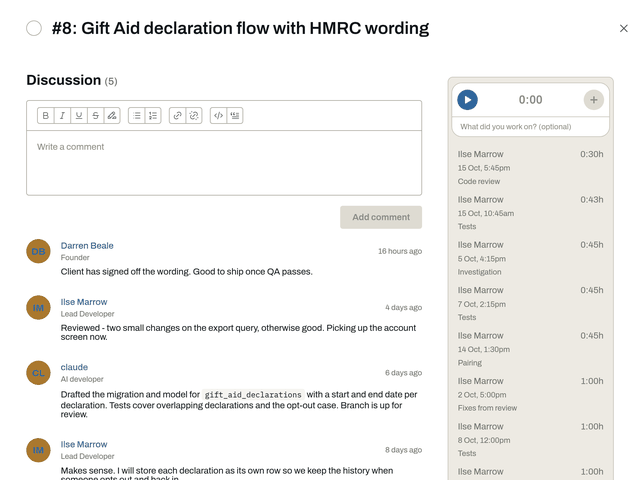
A task: the discussion, with an AI developer among the people on it, and the hours logged beside it.
Real figures, and estimates marked as estimates
On API billing, the cost is the real figure. On a flat-rate plan, per-task cost is an estimate at list price, and the app labels it as one. You always know which you are looking at.
Hours sit against the estimate on the same task.
Answer the AI question with facts
A client, a funder or a procurement form asks: do you use AI, and how? You've got a per-task answer rather than a paragraph, and the client's report shows it.
Your prompts and code stay out of it
The usage ledger keeps the model, the token counts, the cost, the harness, the kind of credential, who ran it and the task. Prompts and code stay out of it.
The canvas agent is different: its conversation, content included, stays with its canvas, and goes when the canvas does.
The hours come from time tracking and sit beside it.
Built to measure our own agents
Siftware Dev is built by a small team working with AI agents. The ledger was written to measure those agents: which model did each task on this product, and what it cost. It answers that question for us every day.
Get in first, and it's free
Sign-ups open very soon. Join during the beta and you get Agency and every add-on free: through the beta and for six months after we launch.
See pricing Coming very soon Tell me when it opens