
Everything your agency runs on, joined up
Projects, time, the schedule, clients, money and what your AI tools cost, joined up in one app. One price per workspace, any number of people, so hiring never puts the bill up.
Join during the beta and get Agency free
Join during the beta and you get Agency and every add-on free: through the beta and for six months after we launch. How the beta offer works
Coming very soon Tell me when it opens
Every client and every job, in one place
The pain: work spread across a task tool, a timer, a spreadsheet and somebody's inbox.
Every client and every job sits in Siftware Dev, with no cap on how many you run. Tasks sit in groups, carry labels, priorities, due dates, attachments and comments, and can depend on each other. Client emails turn into tasks, and subscribers get an email when something changes.
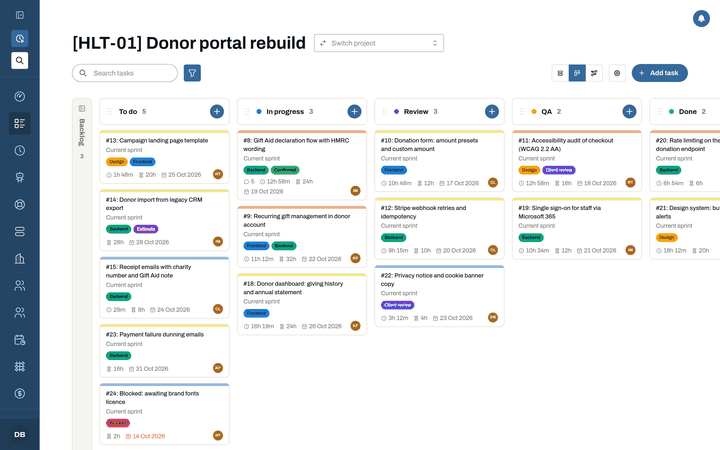
Each project has a board. Drag a card from one column to the next and the whole team sees it. The Gantt plugin shows the same tasks on a timeline, critical path flagged.
Moving from another tool? We move you in: your projects, tasks and logged time from Teamwork, Harvest, Asana, Jira and more, or from spreadsheets.
See where the hours went, at a glance
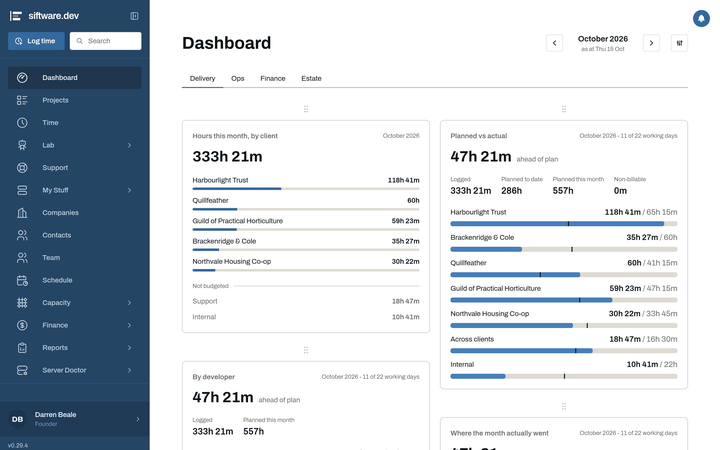
The team dashboard puts hours by client next to what was planned. Pick the widgets you want on it.
The Me tab is your own start page: my tasks, my time this week, what is waiting on me, my projects, my week and the support queue. An Ops tab adds estate health, servers due, app health, the support queue and mail problems.
Catch it on the move, deal with it at your desk
Something comes up on site or in the corridor. Open the app and it goes straight into today's note: a photo, a file, whatever's on your clipboard, or a file from Nextcloud. Back at your desk, turn it into a task or a doc.
Today, Tasks, Activity and Agent actions keep everything that is yours in one place. Every day gets a daily note, with your calendar and meetings beside it. Agent actions lists what agents did on your behalf, and each change can be undone. On the iPhone and iPad it's a native app.
Time that gets logged, and reports clients trust
The pain: timers left running on the wrong device, and Friday's time logged from memory.
Start a timer from the task. It runs on the server, so it's still running when you switch from phone to laptop. Quick-log puts time against any task from anywhere in the app, billable or not.
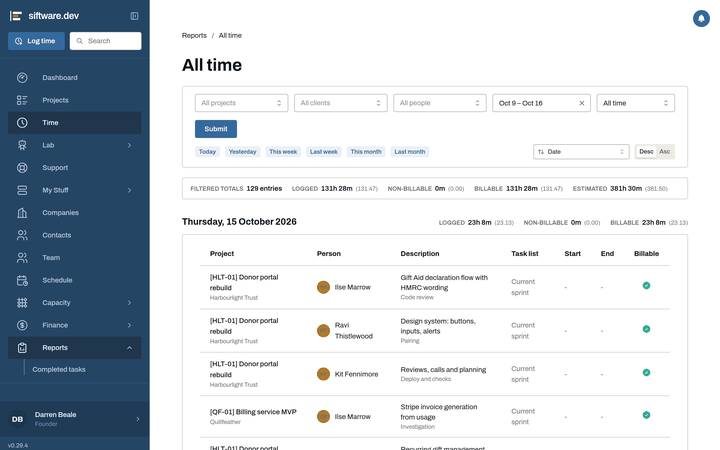
The reports are All time, Over budget, Completed tasks and the Client report, a PDF of a client's hours and budget against plan, ready to send.
Time tracking comes with every plan
Know the month fits before you say yes
The pain: finding out the month was overbooked when it's already half gone.
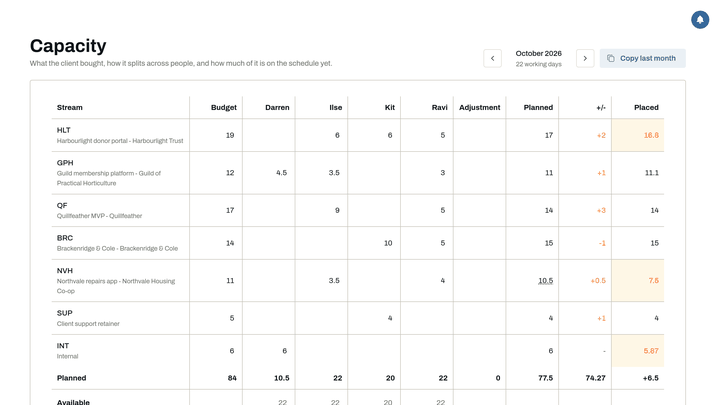
Capacity starts from the money. Each stream of work has a client and a budget in days, set against the days your people actually have. If the month doesn't fit, you know at the start of it.
The schedule shows people down the side and working days across: who's booked on what, who's off, with the bank holidays already in.
The schedule comes with every plan
Spot over-budget work while you can still act
The pain: time, budgets and money in different tools, and over-budget work found at invoice time.
Planned sits against actual while it still matters, and budgets against the estimate. Cashflow, Revenue, Running costs and Insights show the money client by client, and cashflow forecasting shows what's coming in and going out over the months ahead.
Xero keeps invoices and contacts lined up with the work they belong to, and its capture and import run on their own.
Included with Agency, or add it to Core
Know what every task cost in AI
The pain: your developers use AI every day, and nobody can say which model, which client or what it cost.
Each developer connects their Claude Code or Codex to Siftware Dev. Tag a session with its task and it lands in AI costs, with the model and what it cost, per task, per developer and per client, beside the hours. Then you decide what to pass on to the client.
AI costs has tabs for Usage, Inference cost, Client costs, Builds and Jobs.
How the AI ledger works. Included with Agency, or add it to Core.
Stop answering “where are we on this?”
The pain: clients chasing for updates, and status reports written by hand.
Clients log in and see only their own projects, read-only: a client dashboard, task comments, a Timeline and a summary of hours. A limited client role shows less. Social and Calendar have a switch per client.
Client logins have no per-seat charge.
Client logins come with every plan
Sell support and retainers, and prove you kept to them
The pain: retainer hours leak, and nobody can show the response times were met.
The Support plugin gives you Tickets, products and Agreements. An agreement says what a client has bought and what they are owed: pots of hours, retainers and response times, measured against the tickets.
Mail to your support address becomes a ticket, and the team answers from the app. Replies thread back onto the ticket as comments. An inbox agent reads incoming mail, sorts it, and learns your rules from the answers you give it. It suggests; you decide.
How Support works. Included with Agency, or add it to Core.
Look after clients' servers, and show it
The pain: checks happen when someone remembers, there's no proof of care, and nobody knows what hosting costs per client.
If you host and look after servers for clients, their health checks, maintenance reports and costs sit next to the client's work. A check that can't see says unknown, never a false green. The Estate screen groups client, host and checks, with locations.
Health, Agents, Access, Instance and Email cover the rest of running the app.
Servers in the app. Included with Agency, or add it to Core.
Every client, contact and lead beside their work
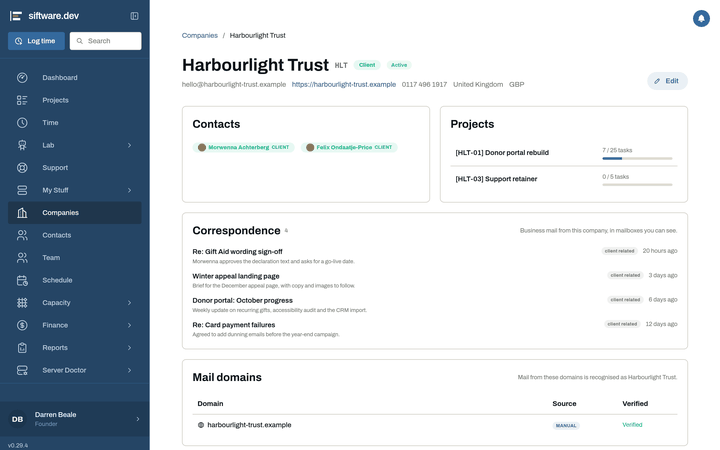
Leads, Companies and Contacts. Companies and the people at them are their own records, with the email domains that belong to each company. A lead pipeline runs from first contact to won work, with where each lead came from.
Run your marketing, and your clients', from the same place
Calendar, Analytics, SEO, Social, Ads, Content and a SaaS console, as plugins you switch on per workspace. Connections are per client, and findings and costs land beside the client's work. What the plugins do
Knowledge next to the work, and never quietly stale
The pain: a wiki nobody trusts, because nobody knows which page is current.
Each doc has an owner, a reach (private, one project, or everyone on staff) and a review date. Stale pages show as stale. Docs link to projects and tasks and turn up beside them.
An Inbox holds docs addressed to you, with an unread badge and your reviews in the same place. Agent notes keep agents' working docs out of the way until a person publishes one.
Canvases give you a freeform space for shapes, frames, lines, tables, checklists and links, over your tasks and docs. An assistant beside the canvas draws on it when you ask, and each change can be undone.
Put agents to work, with a person in charge
A REST API for scripts, bots and agents. Tokens belong to a person or an agent, and each one carries only the permissions it needs. A destructive request from an agent waits for a person to approve it. An agent's changes can be undone, and every change goes in the audit trail.
The MCP server lets Claude Code, Codex or Claude Desktop work as you: read and edit docs section by section, and write a doc for a person, which lands in their Inbox. A person can let a bot act for them for a limited time, with chosen abilities.
Add what your agency needs
Switch on the plugins you need, per workspace. Some are free, like Gantt with the critical path flagged. Some are paid add-ons, like SEO, Social, Ads and Analytics. See what each plugin does
Know who has room, and who changed what
Team, Capacity and Audit. Who is on the team and what they have room for, and an audit trail of changes.
Sign in the way your team already does
People sign in with Siftware SSO, Google, GitHub or Apple, or through your own identity provider (Authentik, Keycloak, or anything that speaks OpenID Connect). An emailed link works for signing in, and for nothing else.
Roles control what each person sees. A developer sees the dashboard, My Stuff, Projects, Tickets and the Schedule. Ops adds Health, Email, Plugins, Imports, Collector tokens and View as. Marketing adds the CRM, read-only, and Marketing.
See exactly what a colleague sees
An admin can see the app as another person, read-only, for 30 minutes.
It also covers support access. A workspace grants consent for 1, 24 or 72 hours, for the whole workspace or one person, with a reason, and can revoke it. Its admins get an email before a view starts, and every request is audited.
One price, any number of people
Per-seat tools that double at renewal make every hire cost more. Siftware Dev charges per workspace, not per seat. Core is £29 and Agency £79 a month per workspace, or £290 and £790 a year. No seat minimums, and hiring never puts the bill up.
Coming very soon Tell me when it opens Hosted for you