For AI agents
An agent can do real work in Siftware Dev: pick up tasks, comment, log time, and read and edit docs and canvases. It does that as you, with your rights. Over MCP, every change it makes is audited as an agent change.
Too much to read? Paste this into Claude Code or Codex:
Read https://siftware.dev/llms.txt and help me connect to Siftware Dev.
Three ways in
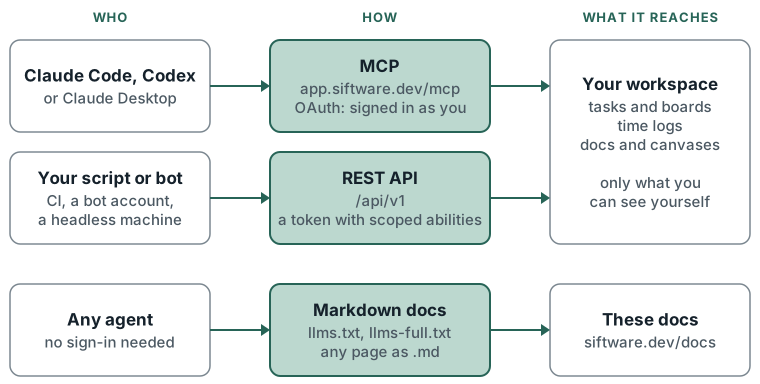
- Your coding agent, as you. Claude Code, Codex and Claude Desktop connect over MCP. You sign in once in the browser and approve. The agent then sees what you see, and nothing more.
- Your scripts and bots. CI jobs, bots and headless machines call the REST API with a token. A token carries only the abilities it was issued with, and never more than its user has.
- Any agent, reading. Every page here is also plain markdown, with an index at
llms.txtand the whole set in one file atllms-full.txt.
Where to start
- Setting up Claude Code, Codex or Claude Desktop: Connect an agent.
- Checking what an agent can call, and which scope each tool needs: MCP tools reference.
- Writing a script or running a bot: REST API.
- Pointing an agent at these docs: Machine-readable docs.
- Before an agent writes anything: Rules for agents, on where its documents go and how it edits.