Connect an agent
Claude Code, Codex and Claude Desktop connect to siftware.dev over MCP. The agent acts as the person who signed in, with that person's rights.
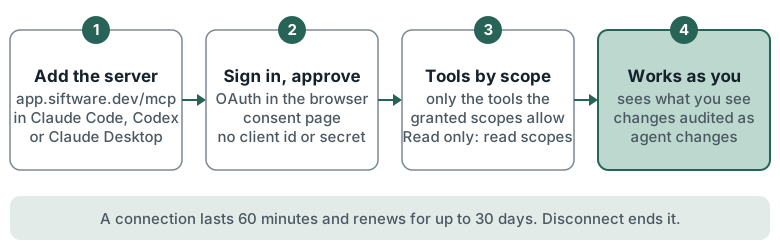
The address
The MCP server is at app.siftware.dev/mcp (https://app.siftware.dev/mcp). Sign-in is OAuth: the client
finds the authorisation server itself, and the person approves on a consent page in the browser. No client id
or secret is needed.
Claude Code
claude mcp add --transport http siftware https://app.siftware.dev/mcp
Then run /mcp in Claude Code, or claude mcp login siftware, to sign in and approve. Add --scope user to
make it available in every project.
Codex
In ~/.codex/config.toml:
[mcp_servers.siftware]
url = "https://app.siftware.dev/mcp"
Then run codex mcp login siftware.
Claude Desktop
- In Claude, open Settings > Connectors > Add custom connector.
- Enter
https://app.siftware.dev/mcp. - Sign in to siftware.dev if asked, then press Connect on the consent page.
In the app
Settings > You > Connections > Connect your agent shows the address, setup for each client and a Read only option. Connected apps, under API tokens, lists each connection and has Disconnect.
What the agent can do
- It acts as the signed-in person. It sees what that person sees. Anything the person cannot see is "not found".
- Each tool needs a scope. A connection holds only the scopes it was granted, and is offered only the tools those scopes allow. See MCP tools reference.
- Every change is audited as an agent change.
- To record the model on each change, send an
X-Agent-Modelheader with the model name.
Limits
- Read only holds the read scopes only. Claude Desktop cannot choose scopes, so it has no read-only option.
- OAuth refuses bot accounts. A bot uses an API token: see REST API.
- Clients, contact logins and bookkeepers are refused.
- The developer, ops and marketing roles have no agent tools: no Connect your agent, and the MCP server answers 403.
- A connection lasts 60 minutes and renews for up to 30 days. Disconnecting ends it.
- For a headless machine, issue an Agent token in Settings > You > Connections > API tokens and send it as
Authorization: Bearer <token>.