Git sources
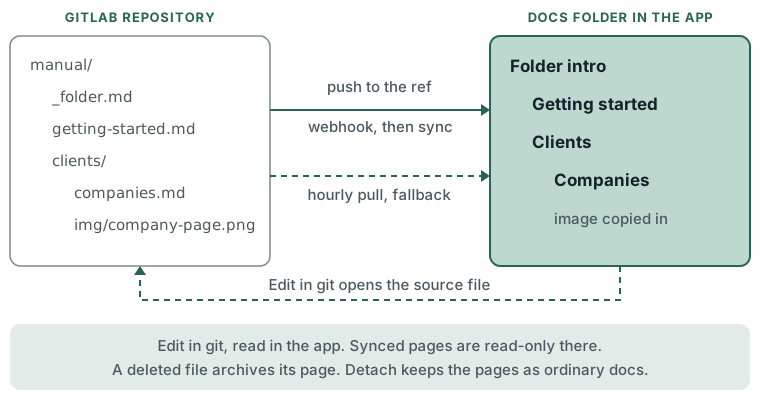
A Docs folder can take its pages from a git repository. Markdown files become pages, subdirectories become subfolders, and every push keeps the folder current. The repository stays the place to edit; the app is where people read.
What you can do
- Attach a GitLab repository, a ref and an optional path to a folder.
- Pin the folder to a branch or tag that moves on push, or to one commit that never moves.
- Sync on every push through a webhook, with an hourly pull as a fallback.
- Ask for a sync now.
- Detach the repository and keep the pages.
- Open the source file from any synced page with Edit in git.
How to
Attaching, syncing and detaching are done through the API (/api/v1), with a personal API token that
holds knowledge:write (Settings > You > Connections > API tokens). There is no attach form in the app.
Attach:
- Find the folder's slug or id in Docs.
- Send
POST /api/v1/articles/<folder>/sourcewith:provider:gitlabbase_url: the git host, for examplehttps://git.example.comrepository: the project path, for exampleacme/handbookref: a branch, tag or commit id, for examplemainpath: optional, the directory inside the repository, for examplemanualtoken: a GitLab access token that can read the repository
- The response carries
webhook_urlandwebhook_secret. The secret is shown once, in this response only. Copy it before closing the response. - The first sync starts straight away.
Add the push webhook in the git host:
- Open the repository's webhook settings.
- Set the URL to
webhook_urlfrom the attach response. - Paste
webhook_secretas the secret token. - Trigger on push events. Save.
A push to the folder's ref queues a sync. A push to another branch is ignored.
Other actions:
- Sync now:
POST /api/v1/articles/<folder>/source/sync. Add"force": trueto apply a sync that was refused for archiving too many pages. - Status:
GET /api/v1/articles/<folder>/sourcereturns the provider, host, repository, ref, path, status (pending,synced,errororpaused), last commit, last sync time, the last error and the files that were skipped, each with a reason. - Detach:
DELETE /api/v1/articles/<folder>/source.
Repository layout:
manual/
  _folder.md          the folder's intro
  getting-started.md  a page
  clients/            a subfolder
    _folder.md
    companies.md
    img/
      company-page.png
Front matter, at the top of each file:
---
key: clients.companies
title: Companies
order: 10
---
| Key | Use |
|---|---|
key |
Stable id. A file renamed or moved with the same key keeps its page, slug, links and revisions. Without key, the path is the identity and a rename archives the old page and makes a new one. |
title |
Page title. Without it, the first # heading, else the file name. |
order |
Position among siblings, a whole number. Without it, name order. |
slug |
The page address, set on first sync only. |
visibility |
personal, project or internal. Optional, and never wider than the folder. |
Limits
- GitLab only. The host must be on the server's list of allowed git hosts; any other host is refused with "That host is not an allowed git host."
- Attaching, changing or detaching needs a person who can edit the folder. A bot cannot. That person's token is stored encrypted under them and is never shown again.
- A folder cannot take a source when it, a folder above it or a folder inside it already has one: "This folder already takes its pages from git, or is inside or above one that does."
- Synced pages are read-only in the app. They show a Synced from git badge, and a banner with the repository, path and commit and an Edit in git link. They cannot be edited, moved or reordered; order and nesting come from the repository.
- Synced pages belong to the folder's owner and take the folder's width. A file asking for a wider
visibilityis skipped. README.mdfiles, and files whose name starts with_other than_folder.md, are not synced. Other non-markdown files are ignored, except images a page uses.- Images: png, jpg, gif and webp, linked relatively from a page. They are copied into the app and kept
after a detach. Images linked by a full
https://address are left as links. - Relative links to other synced pages become links inside Docs. Links outside the synced path point to the file in the git host.
- A deleted file archives its page; the page comes back if the file returns.
- A sync that would archive more than half of the folder's pages, or all of them, is refused and recorded as the source's error. A sync now with force applies it.
- Per folder: 500 files, 512 KB per markdown file, 5 MB per image, 50 MB per sync, 8 folders deep, 8 KB of front matter. A file over a limit is skipped and listed; the rest sync.
- A file list longer than the limit applies nothing.
- The source pauses when the folder is archived, or when the person who supplied the token can no longer edit the folder or leaves.
- On an error, such as a revoked token or an unknown ref, the source shows
errorwith the message and the next hourly sync tries again. - Status, errors and skipped files are read through the API. The app shows no sync status on the folder.
- After a detach the pages stay where they are and become ordinary docs that can be edited in the app.
- Not supported: writing back to git, other providers, LFS, submodules, non-markdown formats.