Capture to today
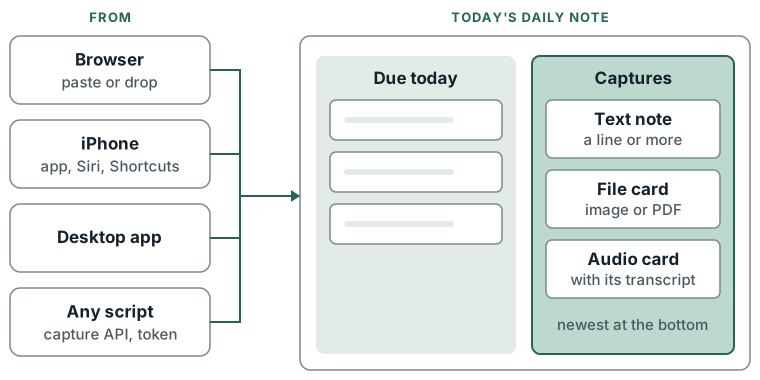
Anything captured during the day - a line of text, a screenshot, a PDF, a recording - lands on today's daily note, beside the tasks due. One inbox per day, reachable from the browser, the iPhone, the desktop or a script.
What you can do
- Paste or drop images, PDFs and recordings straight onto the daily note in the browser.
- Send a note from the iPhone app, Siri or Shortcuts. See iPhone capture.
- Send from any script or tool through the capture API, with a personal API token.
- Record a voice note: the recording and its transcript land as one audio card. See Audio and transcripts.
- Link Nextcloud files as cards.
- Capture something made earlier: a capture made up to 7 days ago lands on that day's note.
How to
Browser:
- Open My Stuff > Today.
- Press Mod+V to paste an image or file, or drop it on the canvas.
Capture API:
- Issue a token with
knowledge:writeunder Settings > You > Connections > API tokens. POST /api/v1/daily-notes/today/noteswithtext,files[](images, PDFs, audio), or both.nextcloud_paths[]adds Nextcloud files as cards (also needsnextcloud:read).- Optional:
captured_atfor a capture made earlier; anIdempotency-Keyheader so a retry writes nothing twice (kept 24 hours). - The answer carries
canvas_id,date,node_ids(top to bottom) andurl.
What lands where
- Captures stack in their own column right of Due today, below the lowest card there. Notes made
before 9 Oct 2026 have an
## Inboxheading, and captures go under it. - A text and its files make a note, then one card per file.
- A recording with text: the text is the transcript, on the audio card. No separate note.
- An open daily note updates when a capture lands.
Limits
- Files: images (PNG, JPEG, GIF, WebP), PDFs and audio (M4A, AAC, MP3, WAV, WebM). Audio up to 25 MB, other files up to 10 MB.
- At most 5 Nextcloud paths per capture.
- Backdating reaches 7 days.
- Not available to client accounts.